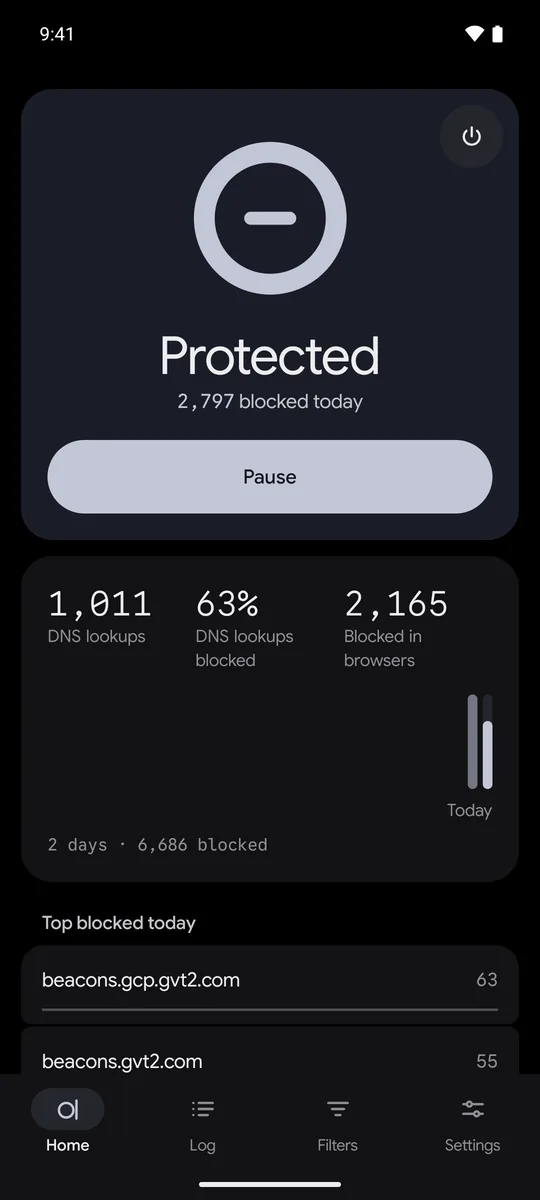
Ads and trackers, blocked in every app. In your browser, the empty boxes and cookie notices go too. All on your phone.
Version 1.0.0. Android 13 or later, 64-bit ARM. No account, no root. Source on GitHub
Log
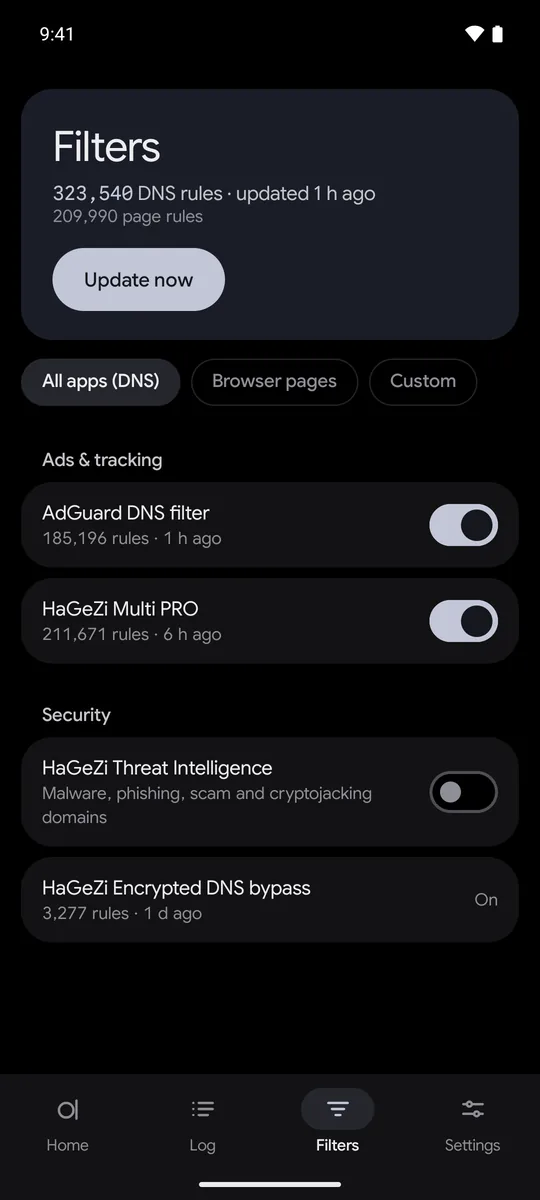
Clear- 323,540
- DNS rules, compiled on the phone
- 98%
- on a public ad block test
- 0.36%
- of the phone’s battery use
- 0
- wakeups while the phone sleeps
Measured on one test phone in October 2026; other phones and lists will differ. The test is adblock.turtlecute.org: 129 of 132 with the default lists.
What Aduster removes
Blocking the request is half the job.
Android browsers mostly take no extensions, so DNS blockers leave an empty hole. Aduster cleans the page itself.
- Ads
- Gone
- Ad space
- Collapsed
- Cookie wall
- Dismissed
- Layout
- Intact
City · Transport
Night buses return to six routes after a two-year pause
By M. Aksoy · 4 min read
The council approved a twelve-month pilot on Tuesday, restoring overnight service on the routes that carried the most late-shift workers.
Buses will run every thirty minutes between midnight and five, with the first departures from the central station.
One filter for every app. A deeper one for your browser.
Each dot is a request. The ones that pop are ads, stopped on your phone.
Every app
A DNS filter. Ad and tracker domains lead nowhere, even when hidden behind a site’s own name.
Chromium browsers
A page filter too. Pages are cleaned before they reach the screen. Firefox gets the DNS filter.
Zero-day ads, caught by on-device AI.
Lists only know ads someone has reported. A neural classifier on your phone catches the new ones.
Spot
Behavioural heuristics flag anything that looks or acts like an ad.
Score
A quantized model rates each suspect, offline, on the phone.
Remove
Ads fold away. A rule is saved, so next time they never load.
On-device AI
Scanning2 ads removedRail strike ends after nine days
Unions accepted the revised offer late on Sunday, and the first trains run at dawn.
Commuters should expect crowded services until Wednesday.
Cleaned on this phone. Nothing uploaded.
Your HTTPS is opened on the phone, and nowhere else.
Strict rules, built in. None of them is a setting you can get wrong.
Browser
Padlock as usualShows its own warning
Aduster
Opened, filtered, sealed againNot openedVerification failed, steps aside
theledger.exampleyourbank.exampleexpired.example
Serves the page as usualTalks to your browser directlyIts certificate ran out
Certificate validCertificate expired
Ads removed before the page reaches your browser.Banks, payments, sign-in, government and CAPTCHA pages are never decrypted. Not even once.Certificate problems are never hidden. You see your browser’s own warning.
The key never leaves the app
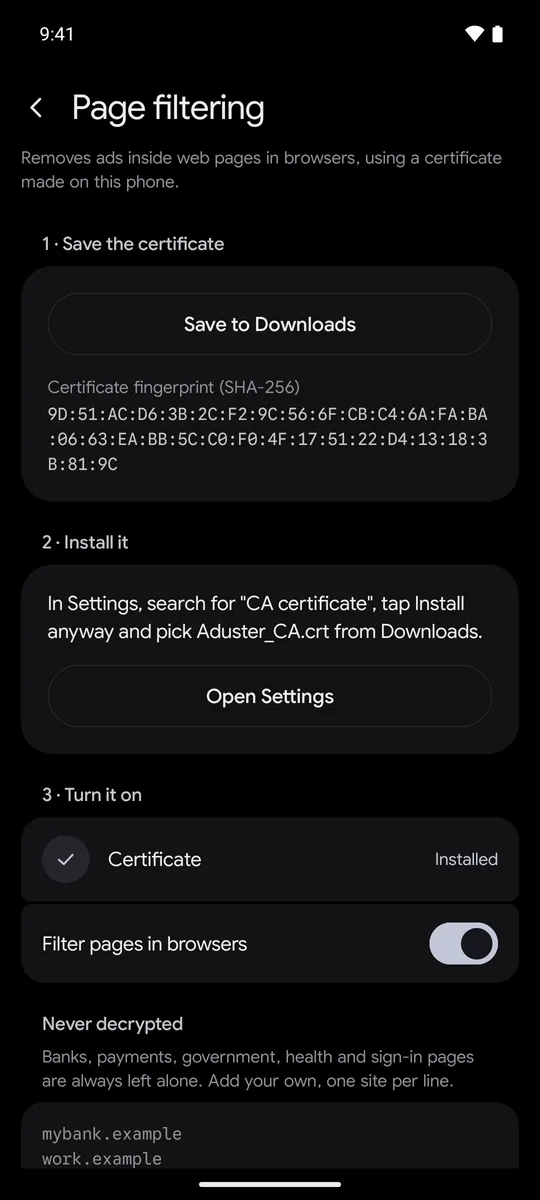
The certificate is made on your phone and used only for browsers.
Checked the way Chrome checks
Every site’s certificate is checked against the Chrome Root Store.
Memory-safe Rust core
The DNS engine, the rule matcher and the page engine are written in Rust.
No root, nothing hidden
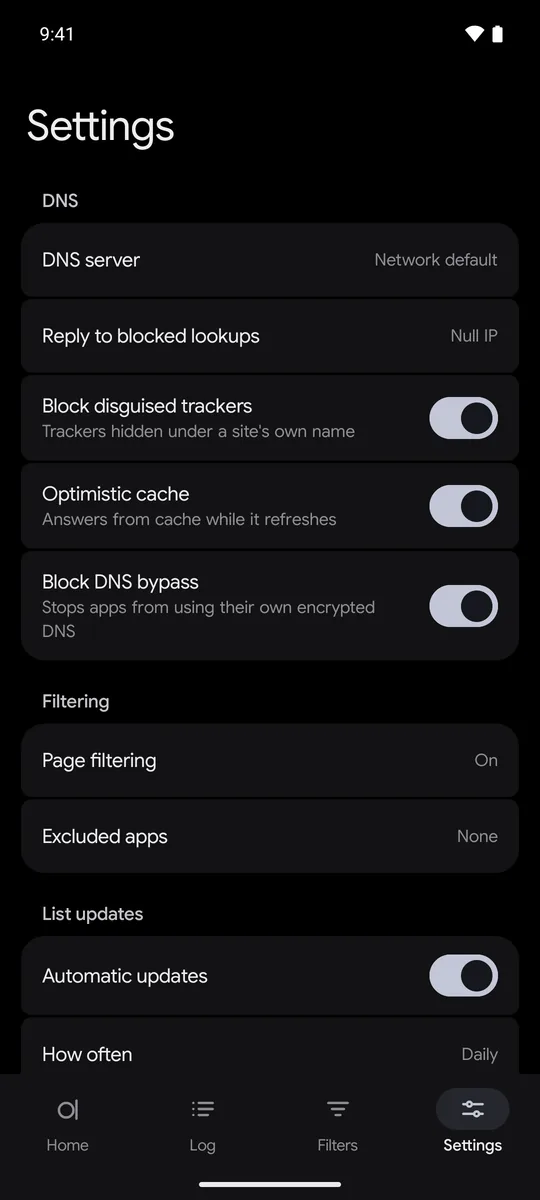
Android’s VPN carries DNS only, nothing else. The certificate is yours to remove in Settings.
Your data stays on your phone.
Filtering and AI run locally. There is no Aduster server and no account.
-
On device
Your DNS lookups
Matched on the phone. The rest go to the DNS server you pick.
-
On device
Pages, cookies and headers
Filtered on the phone. Never uploaded.
-
On device
AI analysis
The model runs offline. No page or script is sent anywhere.
-
On device
The certificate’s private key
Made on the phone. Never leaves the app.
-
On device
The log and your statistics
Kept on the phone. Clear them any time.
-
Never opened
Banking, payments, sign-in
Not even opened. Passed through sealed.
Less to load means less to burn.
The browser used 58% less CPU time on the same pages. When your phone sleeps, Aduster sleeps too.
0.2 s
of CPU per five idle minutes
The always-on filter’s total cost, measured.
0
wakeups while the phone sleeps
No timers, alarms or wakelocks.
Native Rust
on the low-power cores
The DNS engine stays on the phone’s efficient cores.
Built like infrastructure.
Results you can check for yourself.
Quiet, and honest about what it’s doing.
One state. A few honest numbers. Black or light.
Bootstrapped. Built for privacy.
Aduster is a bootstrapped cybersecurity initiative, founded in October 2026 by Arda.
Arda
Founder
The source is on GitHub, published to read and review.
On-device privacy
Filtering, AI and logs stay on your phone. Your data, your device, your call.
Memory-safe native performance
The engine is native Rust: fast, lean, and free of whole classes of memory bugs.
Advanced heuristic analysis
Behavioural heuristics and on-device AI catch ads no list has seen yet.
Before you ask.
Which browsers does it work with?
DNS filtering covers every app, every browser included. Page filtering works in Chromium browsers and is verified in Chrome and Brave. Firefox gets DNS filtering only.
Which phones does it run on?
Android 13 or later, on a 64-bit ARM phone. No root needed.
How do I install and update it?
Download the APK from GitHub and open it on your phone. New versions come out on GitHub; Obtainium can install them for you.
Can I use it alongside another VPN?
Not at the same time. Android runs one VPN app at once. Aduster uses it for DNS only, on the phone; it is not a VPN to a server.
What if a site breaks?
Tap its domain in the Log and allow it, or add the site to Never decrypted. Anything that misfires on a site also steps back there by itself.
Why does it ask me to install a certificate?
To clean a page, Aduster has to read it, and your browser only allows that for a certificate it trusts. It is made on your phone and used only for browsers. Without it, Aduster still filters by DNS.
Is it open source?
The source is on GitHub to read and review, but it is not under an open-source licence. The filter lists and libraries it uses keep their own.
Does anything leave my phone?
Nothing about you. Besides the sites you visit, the phone contacts only the filter list hosts and the DNS server you pick.
Take back the screen.
Version 1.0.0. Android 13 or later, 64-bit ARM. Check the download against the SHA-256 on the release page.
- 1
Install
Open the APK on your phone. Allow installs from your browser when asked.
- 2
Turn on
Open Aduster and tap Turn on. Android asks to allow a VPN: it filters lookups on the phone.
- 3
Clean pages too
In Settings, open Page filtering and follow its three steps.